
Crop 9 student photos and signatures from one sheet online. Adjust frames, customize photo and signature size, and download JPG files easily.
Student Photo & Signature Cropper Online
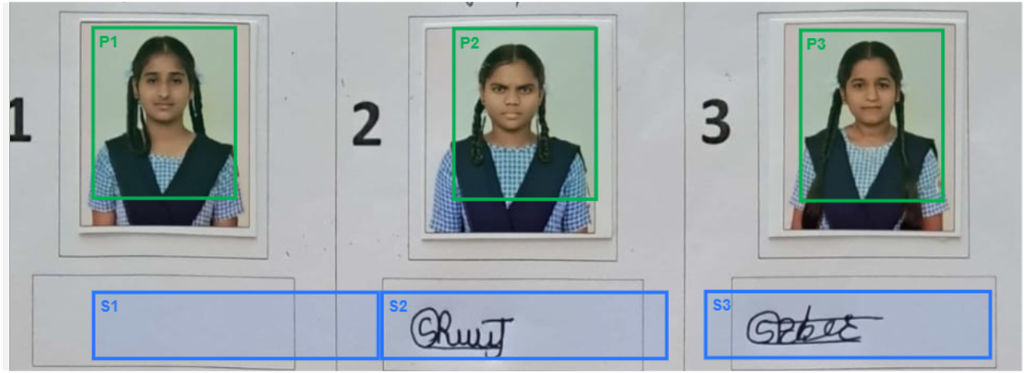
Preparing student photographs and signatures one by one can take a lot of time. Our Student Photo & Signature Cropper Online helps teachers, schools and colleges quickly create individual student photo and signature files from a single image.
Upload your student sheet, select the page, adjust the photo and signature frames, choose your required output size, and create individual JPG files.
🚀 Start Using the Free Student Photo Cropper
How to Use the Student Photo & Signature Cropper
Step 1 — Upload your student sheet
Upload one JPG, PNG or WEBP image containing the student photographs and signatures.
Step 2 — Select the A4 page
Adjust the four corners around the required page and click Use Selected Page.
Step 3 — Adjust photo and signature frames
Move each frame to the correct student photograph or signature.
You can also:
- Resize the frame
- Move the frame
- Change X and Y position
- Enter exact width and height
- Change all 9 photo frames together
- Change all 9 signature frames together
Step 4 — Select output size
You can enter your required:
Photo
- Width
- Height
- Maximum file size
Signature
- Width
- Height
- Maximum file size
Step 5 — Create student files
Click Create 9 Students.
The tool generates individual photo and signature JPG files for each student.
Features
📸 Multiple Student Photos
Create individual files for up to 9 students from one sheet.
✍️ Signature Extraction
Crop individual student signatures separately.
🎯 Adjustable Frames
Move and resize your crop frames according to the actual photograph and signature positions.
🔢 Custom Output Dimensions
You are not restricted to one fixed size. Enter your own required width and height.
⚡ Browser-Based Processing
The tool processes the images directly in your browser.
📥 Individual Downloads
Download each student’s photo and signature separately.
📦 Download All Files
Create all 18 JPG files and download them individually.
What Photo Size Can I Use?
The tool provides default dimensions, but you can change them according to your requirement.
For example:
Photo: 150 × 180 px
Signature: 300 × 70 px
You can enter different dimensions whenever your school, college, examination form or application requires them.
Who Can Use This Tool?
This tool can be useful for:
- 👨🏫 School teachers
- 🏫 Schools
- 🎓 Colleges
- 📝 Examination departments
- 📋 Administrative staff
- 👨💻 Data-entry operators
- 📸 Student documentation work
Frequently Asked Questions
Is this student photo cropper free?
The tool is designed to allow you to crop and prepare student photographs and signatures directly online.
Can I crop 9 students at once?
Yes. The tool is designed to create 9 student photo and signature sets from one selected sheet.
Can I change the photo frame size?
Yes. You can resize the frame manually or enter exact width and height values.
Can I change all photo frames together?
Yes. Enter the required width and height and use Apply to All 9 Photos.
Can I change all signature frames together?
Yes. Enter the required dimensions and use Apply to All 9 Signatures.
Can I choose my own output size?
Yes. Photo and signature output width, height and maximum file size can be customized.
Do I need to install software?
No. The cropper works in your web browser.
About Unstoppable Grow Education
Unstoppable Grow Education provides practical digital education tools and learning resources designed to help people work smarter and develop useful skills.